For notes to be entered on the page, the Insertion tool must be selected, and the Entry Cursor should be placed at the desired staff and beat location. Notes are entered according to the Current Command (as displayed in the Score Controls). Commands can be entered by typing on the keyboard, by selecting an image in the Note Palette (which is also located in the just above the score), or by selecting the image from the Image List panel in the Info menu.
There are three different categories of notes:
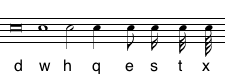
The Commands for regular notes are:
| Command | Image | British Terminology | Duration |
|---|---|---|---|
| d | double whole note | Breve | 8.0 beats |
| w | whole note | Semi-breve | 4.0 beats |
| h | half note | Minim | 2.0 beats |
| q | quarter note | Crotchet | 1.0 beat |
| e | eighth note | Quaver | 0.5 beats |
| s | sixteenth note | Semiquaver | 0.25 beats |
| t | thirty-second note | Demisemiquaver | 0.125 beats |
| x | sixty-fourth note | Hemidemisemiquaver | 0.0625 beats |
| z | one-twenty-eighth note | Semihemidemisemiquaver | 0.0625 beats |
Graphic notes commands have a prefix of "&" (eg &w, &h, &q). Grace notes have a prefix of "g" (eg. gw, ge, gs). Graphic notes are only used in instances where the notation requires notes that to be unmeasured. Likewise, grace notes can be positioned freely in front of or after regular notes.
|
|
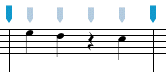
Rests use the same sequence of commands with a prefix of "r" (eg. rw, rh, rs) and graphic rests have the same sequence of commands with the prefix "&r". As an alternative, rests can be entered without the "r" prefix by using Command-r (or the Insert Rest button on the Control panel). This short cut allows you to insert rests of the same duration as the last note without changing the Command. In the example below, the Command was set to "q", then two notes were entered followed by Command-r then another note.
When entering regular notes or rests, commands can combine any of the duration characters (d, w, h, q, e, s, t, x, z, and .) to create a sequence of tied notes or repeated rests. Thus the command "q." will create a dotted quarter note while "qe" will create a quarter note tied to an eighth note.
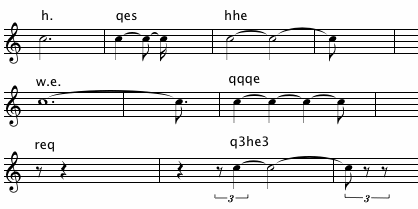
It is also possible to indicated simple tuplet values in the command -- "q3e5" will create a triplet quarter note tied to a quintuplet eighth note. (A number 2 - 9 following a duration is interpreted as a tuplet value). Some examples of commands and the results should make this clear:| Command | Duration | Notes |
|---|---|---|
| h. | 3.0 beats | 1/2 note (dotted) |
| qes | 1.75 beats | 1/4 tied to 1/8 tied to 1/16 |
| hhe | 4.5 beats | 1/2 tied to 1/2 tied to 1/8 |
| w.e. | 6.75 beats | whole (dotted) tied to 1/8 (dotted) |
| qqqe | 3.5 beats | 1/4 tied to 1/4 tied to 1/4 tied to 1/8 |
| req | 1.5 beats | 1/8 rest followed by 1/4 rest |
| q3he3 | 3.0 beats | tripet quarter followed by 1/2 notes followed by a triplet eighth note |
Normally, notes values will be entered as indicated by the series of durations even if the ties contradict the normal beat divisions of the measure. If you want ties to be automated so that they always conform to standard beat divisions in the measure change the Tie Rule preference (in the Rules tab of the Preference Panel).
Thus, if you are on the fourth beat of a measure and you want a note that lasts 4 beats, type the command "qh." (or "qhq" if you want the half note at the beginning of the second measure to be tied to a quarter rather than entered as a dotted half.)
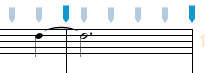
If you type the command "w" a whole note will be place at the fourth beat of the measure:
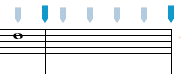
Although this may not seem to be a useful procedure at first, it allows you far more flexibility than if NoteAbility always calculated the tied groups. For example, creating triplets across a main beat or a barline is easy to do in NoteAbility. Here, quarter notes were entered with the triplet button checked.
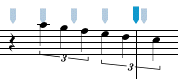
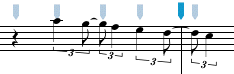
If this is not desired, the commands could be set to combinations of "q" and "ee" to create:
|
|
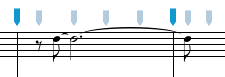
In the next example the command "eh.e" was used to enter a note at beat 1.5:
If Auto Increment is on, the Entry Cursor will move forward when a note or rest has been entered. If Auto Beam is on, notes are automatically beamed when a beat group has been completed. If Auto Format is on, the system is formatted whenever the Entry Cursor moves from the end of one system to the beginning of the next. These setting can be turned on and off from the Preferences panel.
|
|
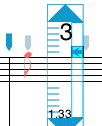
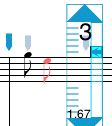
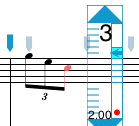
Tuplets (i.e. triplets, quintuplets and other groupings) are set with the check boxes on the Score Controls. The tuplet remains active until the check is removed. (E.g. if an eighth note is selected and the triplet check box is selected, triplet eighths will be entered.) Once a complete triplet group has been entered, the triplet number (with a bracket if necessary) is added. The stages of entering a beat of triplet eighths are:
|
|
Accidentals can be added to the last note entered several different ways:
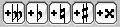
| Command - 2 | Add Double Sharp |
| Command - 3 | Add Sharp |
| Command - 4 | Add Natural |
| Command - 5 | Add Flat |
| Command - 6 | Add Double Flat |
Normally redundant accidentals (after the first accidental on that pitch in the measure) are not shown. If you want the accidental to be shown, use the Force Accidental menu item (Command - 1). In the example below, the F natural in the last beat is considered to be redundant, so it only appears if the accidental is forced.
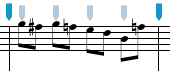
If you prefer an accidental behaviour other than the normal "classical" behaviour of accidentals (i.e. accidentals are considered to carry through the current measure, then you can select a different Accidental Rule from the Rule tab of the Preferences panel.
See also


© Keith A. Hamel 1998-2005 - All Rights Reserved |
 - Add Grace Slash and Remove Grace Slash menu items (in the Modify/Notes menu) can be used to add or remove a slash to a grace note