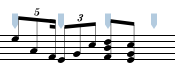
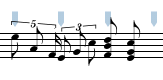
The Modify/Beams menu lists commands for forming and removing beams.
| Beam Notes | ⌘B | Joins all selected notes into a single beamed group. |
| Beam Each Group | ⇧⌘B | Joins each shift-selected group into a beamed group. |
| Beam On Beat | ⌥⌘B | Joins selected notes and rests into beam groups according to the beat divisions of the measures. |
| Unbeam Notes | ⇧⌘H | Breaks any selected beamed notes into unbeamed notes. |
| Straighten Beam | ⌘| | Adjusts the beam angle so that the beam is horizontal. |
| Add/Remove Begin Repeat | Adds a begin repeat barline at the beginning of the current measure. | |
| Beam Extensions | ▶ | Displays the Beam Extension submenu. |
The UnBeam Notes menu item (Command-H) removes the beams from selected notes. (Only one note in the group need be selected for the beam to be removed.) The positions of the stems will be recalculated once the beam has been removed.
The Beam Notes menu item (Command-b) adds a beam to all selected notes and rests provided that they all belong to the same system. (Beaming across staves within the system and across barlines is permitted.)
|
|
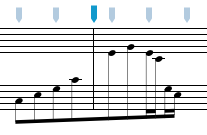
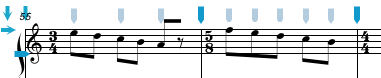
The Beam On Beat menu item beams selected notes and rests according to the beat divisions in the measure. In the example below, the entire passage was selected and the Beam On Beat command applied.
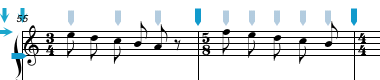
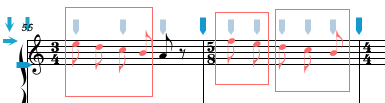
The Beam Each Group menu item (Command-B) forms a beam from each shift-selected group or notes and rests. This command provides more flexibility than the Beam On Beat command. The example below shows the shift-selected areas and the results of the Beam Each Group command.
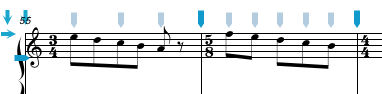
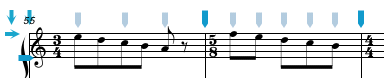
The Straighten Beam menu item (Command-Z) adjusts the beam angle so that it is horizontal. The example below shows the results of the Straighten Beam command applied to all three beams.
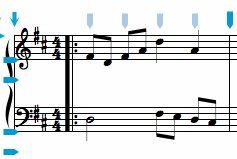
The Add / Remove Begin Repeat menu item adds (or removes is one is already present) a Begin Repeat barline at the beginning of the current measure. These barlines are necessary in situations where the first measure of a systems has a begin repeat barline. The barline is placed just before the beginning of the first beat as shown below:
|
|
The Beam Extension menu is used for graphically connecting beams across systems. Normally extensions should only be added once your score has been formatted and you require a beam to graphically appear as if it is connected from one system to the next.
| Extend Beam Left (+) | ⌥⇧⌘- | Extends the selected beam to the left. |
| Extend Beam Right (+) | ⌥⇧⌘= | Extends the selected beam to the right. |
| Clear Beam Extensions | ⌥⇧⌘= | Clears the beam extension from selected beams. |
| Beam Flag Left | Creates a short beam flag to the Left of the first note in the beam. | |
| Beam Flag Right | Creates a short beam flag to the Right of the last note in the beam. |
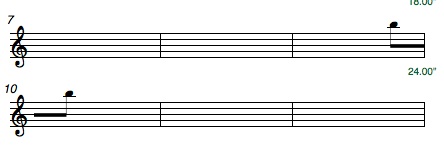
The Extend Beam Left and Extend Beam Right menu items alter the graphical appearance of the selected beam so that the beam extends a short distance beyond the first or final stem of the beam group. This feature is useful when you want a beam to appear as if it is extending from one system to the next. In the example below, beam extensions have been added to the last beam group on the first system and to the first beam group on the second system. The number of beams will depend on the note value of the selected note. In the case below an eighth note was selected and altered to have a beam flag so there is one beam.
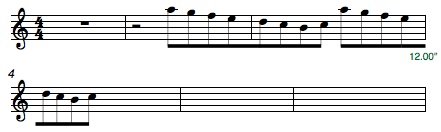
The Beam Flag Left and Beam Flag Right menu items alter the graphical appearance of single notes so that there is a beam extending to the right or left edge of the current system. This can be used for creating the beams between single notes across systems.
See also


© Keith A. Hamel 1998-2005 - All Rights Reserved |
 - In some instances large beam groups may have to be edited using the Beams pane
in the NoteAbility Inspector.
- In some instances large beam groups may have to be edited using the Beams pane
in the NoteAbility Inspector.