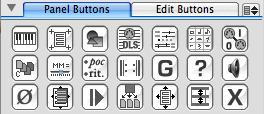
Panel Buttons Tab
The Panel Buttons tab view contains buttons which correspond to many of NoteAbilityPro panels. In most cases, clicking on the button makes the panel visible, and clicking the button a second time hides the panel. This is not the case for the Page Setup, buttons since these panels are automatically closed after they are used.
The following panels have buttons in the Panel Button tab view:
 | Keyboard panel |  | Page Setup panel |  | Image Library panel |
 | Tracks panel |  | Preferences panel |  | Command List panel |
 | Midi Ports panel |  | Copy Types panel |  | Tempo Map panel |
 | Text Library panel |  | Playback Map panel |  | Guido Import/Export panel |
 | Help panel |  | Audio Units panel |  | Panic panel |
 | Overview panel |  | Midi Recorder panel |  | Extract Parts panel |
 | Document Size panel |  | Staff Spacing panel |  | Extended Notes panel |
Whenever one of these panels is open, the button is highlighted to indicate that it is already visible.
Edit Buttons Tab
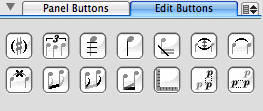
The Edit Buttons tab view contains shortcuts for some of the most common editing operations. The following actions can be performed using these buttons:
 | Add Parentheses to accidentals |  | Form Tuplet from notes |  | Add or Remove Ledgers from notes |
 | Add or Remove Stems from notes |  | Add Grace Slash to notes |  | Flip Tie direction |
 | Tie notes |  | Un-tie notes |  | Beam notes |
 | Un-beam notes |  | Straighten beam angle |  | Hide or Show Ruler |
 | Align Vertical |  | Align Horizontal |
As with all editing operations, you must select the note or notes to be altered before clicking on the button.
See also


© Keith A. Hamel 1998-2005 - All Rights Reserved |